Blog


    Running Ollama on Google Colab Through Pinggy


    Ollama Google Colab Pinggy AI Deployment LLM Hosting OpenWebUI Python SDK
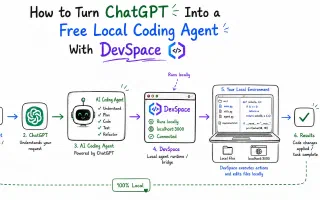
    Running large language models locally can be expensive and resource-intensive. If you’re tired of paying premium prices for GPU access or dealing with complex local setups, there’s a better way. Google Colab provides free GPU resources, and when combined with Pinggy's tunneling service, you can run Ollama models accessible from anywhere on the internet. This comprehensive guide will show you exactly how to set up Ollama on Google Colab and use Pinggy’s Python SDK to create secure tunnels that make your models accessible through public URLs.

    Forward Ollama Port 11434 for Online Access: Complete Guide


    Ollama port forwarding Tunneling AI API Remote Access LLM Hosting
    Running AI models locally with Ollama gives you complete control over your data and inference, but what happens when you need to access these models remotely? Whether you’re working from different locations, collaborating with team members, or integrating AI into web applications, forwarding Ollama’s default port 11434 is the key to unlocking remote access to your local AI models. This comprehensive guide will show you exactly how to forward Ollama’s port 11434 to make your local AI models accessible online using secure tunneling.

    Self-hosting Obsidian


    obsidian self-hosted Docker couchdb livesync Pinggy ngrok
    Obsidian has become one of the most popular note-taking apps for developers, writers, and knowledge workers but its official Sync service costs $5/month. If you’d rather keep that money and own your data entirely, self-hosting is the way to go. In this guide, I’ll show you how to set up your own Obsidian sync server using Docker, CouchDB for real-time replication, and Pinggy for secure remote access all at virtually zero cost.

    What is 127.0.0.1 and Loopback?


    networking localhost 127.0.0.1 loopback development
    If you’ve ever typed localhost in your browser or seen 127.0.0.1 in configuration files, you’ve encountered one of networking’s most fundamental concepts: the loopback address. This special IP address is your computer’s way of talking to itself, and understanding it is crucial for anyone doing development work. Summary What is 127.0.0.1? The address 127.0.0.1 is the standard IPv4 loopback address that always points to your own computer. It’s the IP address behind “localhost” and enables local network communication without ever leaving your machine.

    How to Self-Host Any LLM – Step by Step Guide


    self-hosted AI Ollama Open WebUI Docker LLM Deployment AI Privacy
    Self-hosting LLMs is no longer just for infra teams. With tools like Ollama and Open WebUI, you can run capable models on your own machine, keep conversations private, and avoid unpredictable API bills. For developers, founders, and small teams, this setup gives you more control without adding much operational complexity. In this guide, you will build a local AI stack using Ollama + Open WebUI on Docker. By the end, you will have a ChatGPT-style interface running on your system, with an optional secure way to share it outside your local network.

    USA, Europe, or China - Who has the best AI Models?


    LLM comparison AI models 2026 GPT-5.1 Claude Opus 4.5 Gemini 3 Pro Grok 4.1 DeepSeek Qwen3 Mistral Large 3 global AI race
    The AI world in 2026 has shifted dramatically. What was once a clear American lead has transformed into a fierce, high-stakes battle for supremacy. The gap has not just narrowed; in some areas, it has vanished completely. The US remains the powerhouse of pure scale and multimodal integration, but 2026 has arguably been the year of China’s “efficiency revolution,” with models that rival the best from Silicon Valley at a fraction of the compute cost.

    Best Free & Open-Source AI Image Generators to Self-Host


    AI image generation self-hosted open-source FLUX.2 HunyuanImage Qwen machine learning
    The center of gravity in AI image generation has quietly moved. A year or two ago, if you wanted good AI image generation results, you defaulted to an API and didn’t think much about it. That’s no longer true. Open-weights models have caught up, and arguably overtaken in some areas. And running them yourself is no longer a science project. Self-hosting used to be about ideology or cost-saving hacks. Now it’s becoming a practical choice.

    Best AI Tools for Coding in 2026


    AI coding tools GitHub Copilot Cursor development programming
    The landscape of AI-powered coding tools has evolved dramatically in 2026, transforming how developers write, debug, and maintain code. From intelligent autocomplete suggestions to full codebase analysis and refactoring, AI coding assistants have become indispensable tools for modern software development. Whether you’re a solo developer looking to boost productivity or part of a team seeking to streamline your development workflow, choosing the right AI coding tool can significantly impact your coding efficiency and code quality.

    What port does 'ping' work on?


    networking ICMP ping protocols troubleshooting
    ping doesn’t use a TCP or UDP port at all. Zero. None. Nada. That’s because ping doesn’t even use TCP or UDP in the first place - it works on a completely different protocol layer: ICMP (Internet Control Message Protocol). You could sit there with Wireshark running and watch packets fly by all day, but you won’t find a dst port=80 or dst port=443 in a real ICMP ping. If you’re used to troubleshooting with tools like telnet or nc that always need a port number, this can feel super weird.

    UDP vs TCP: Complete Guide to Network Protocols in 2025


    networking protocols tcp udp guide
    When building network applications, developers face a fundamental choice between two core internet protocols: TCP and UDP. This decision can make or break your application’s performance, affecting everything from user experience to system reliability. Understanding the differences between UDP and TCP isn’t just academic knowledge - it’s practical wisdom that determines whether your online game feels responsive, your video call stays smooth, or your financial transaction completes successfully. Summary TCP (Transmission Control Protocol)